AI Command Hub
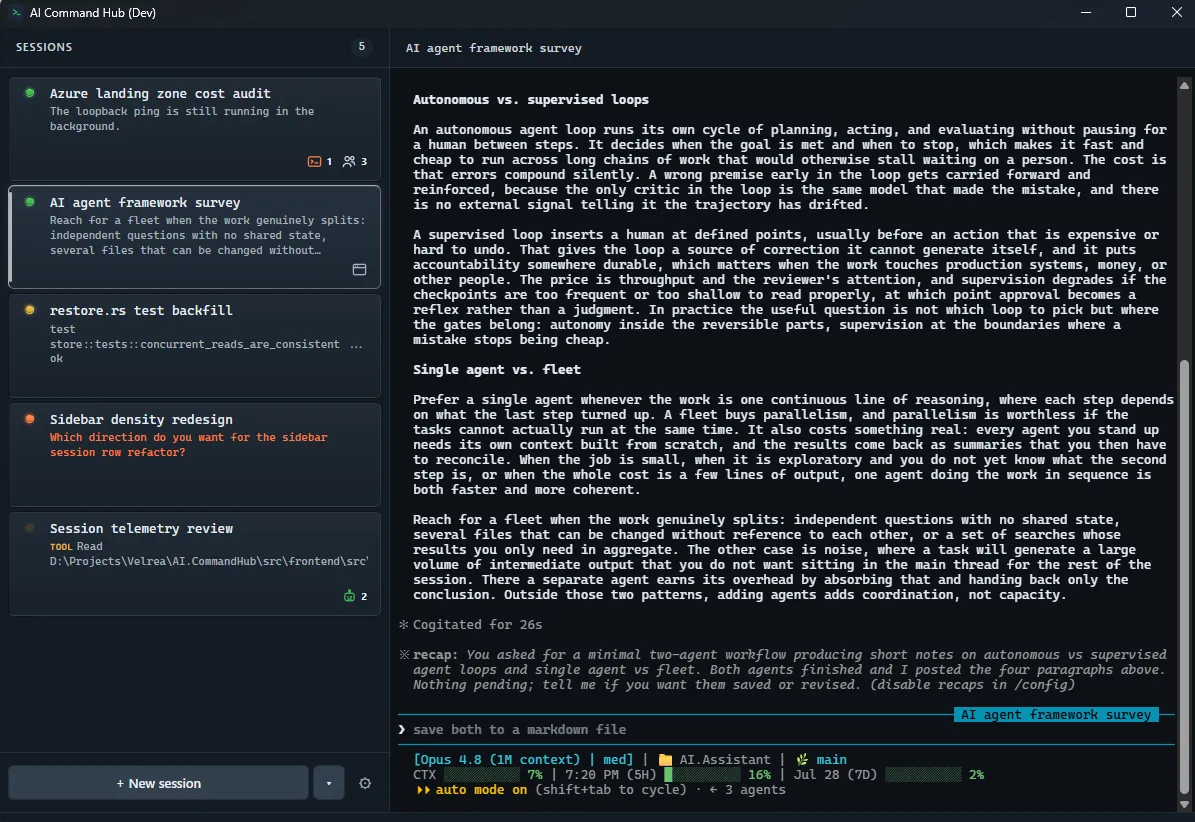
I run several Claude Code sessions at once, and I was constantly mixing them up. A pull request would be bound to the session that generated it, and then I would go back and start talking about it in a different session, confusing the sessions and creating more churn, and it was starting to become a real problem. I wanted a way to keep my sessions organized, where I could see what each one was doing at a glance and keep the browser tabs I had open tied to their respective sessions so I would stop getting things mixed up.
Features
AI Command Hub is a native desktop app, a Rust backend and a React front end packaged by Tauri. I built it to solve these problems for myself, and I now use it as my interface for running my Claude Code sessions.
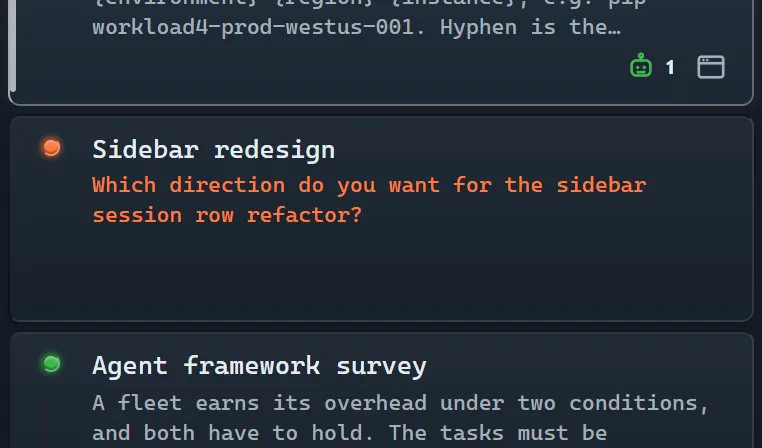
- Session sidebar
- A single vertical list of every running session, all in one place.
- Status indicator
- A status light on each session shows whether it is idle, waiting for input, or working.
- Activity icons
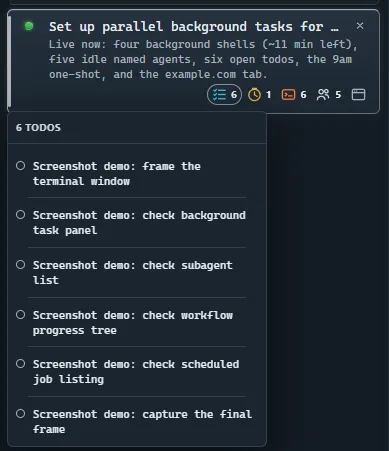
- A row of icons under each session shows any background work it has running, like subagents, tasks, and workflows.
- Live tail
- A running tail on each session shows what it is doing right now, readable without opening it.
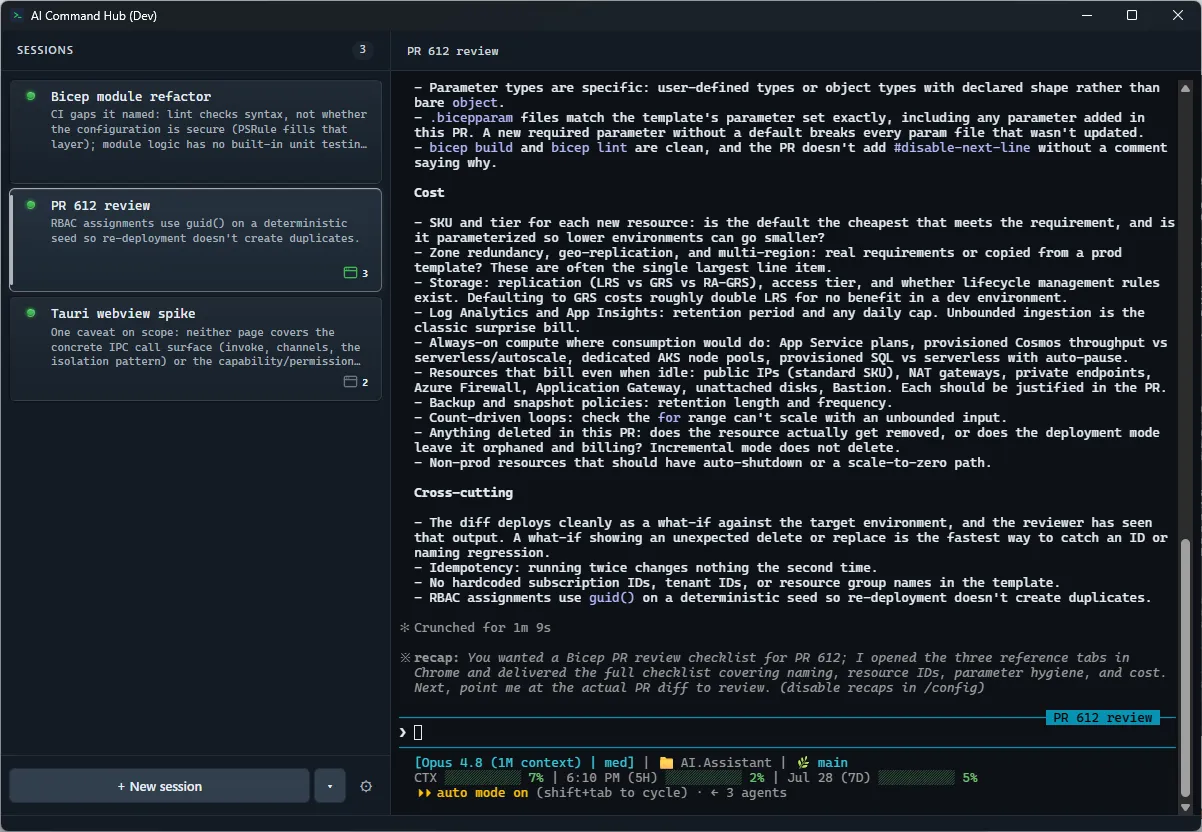
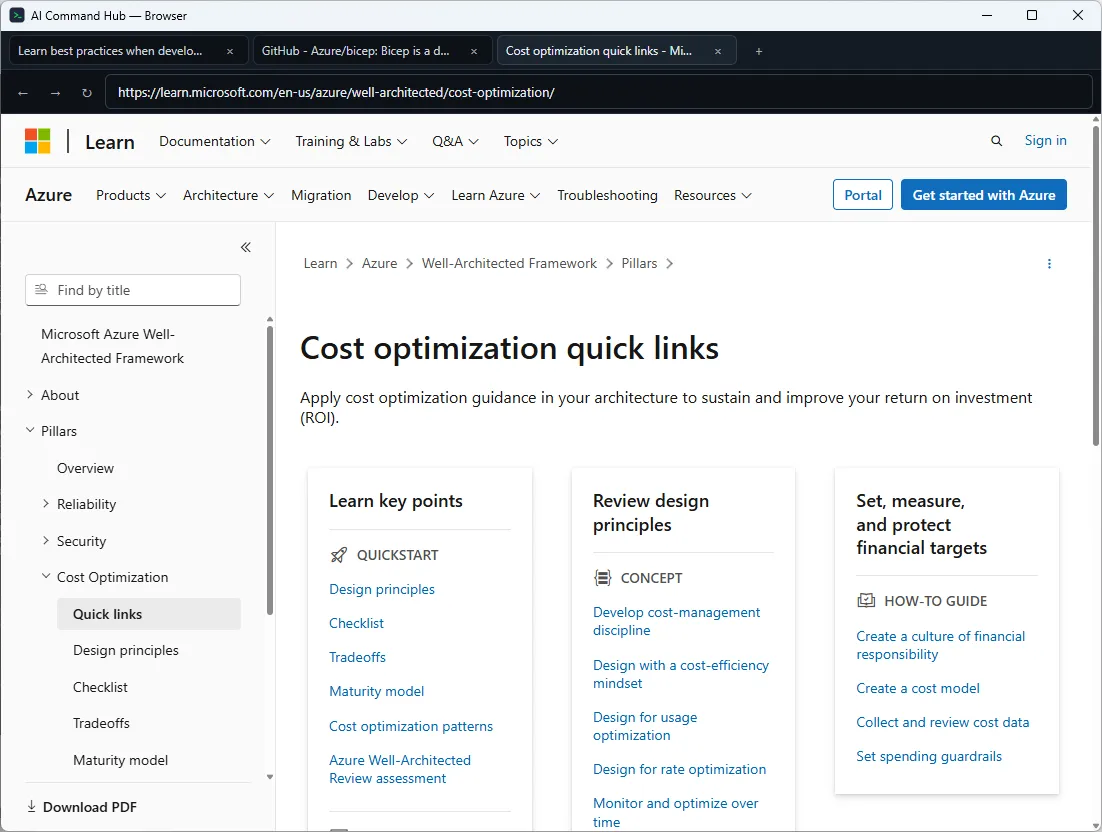
- Per-session browser
- A lightweight browser pinned to each session, so any tabs opened from a session show only for that session.
- Session restore
- Every open session is recorded to disk as it runs, and each one comes back on the next launch, relaunched in its own working directory with its conversation resumed and its browser tabs reopened.
- In-app updates
- The app checks for a new release on its own, flags it in the sidebar when one is available, and installs it in place once accepted.
How it’s built
Detecting and showing state
Claude Code takes a --settings flag that accepts a file path or a raw JSON string. Hooks defined there run alongside whatever hooks are already configured. Every matching hook fires, and identical handlers are deduplicated by command. So each session launches with its own instrumentation injected, and nothing already set up in configuration is disturbed.
The hooks are the entire interface, and they drive a state machine. Each one POSTs to a local server the backend runs, and the payload is inspected to determine whether a transition has occurred. The machine sits right on the border of complexity where a state machine is easier to follow than the equivalent branching.
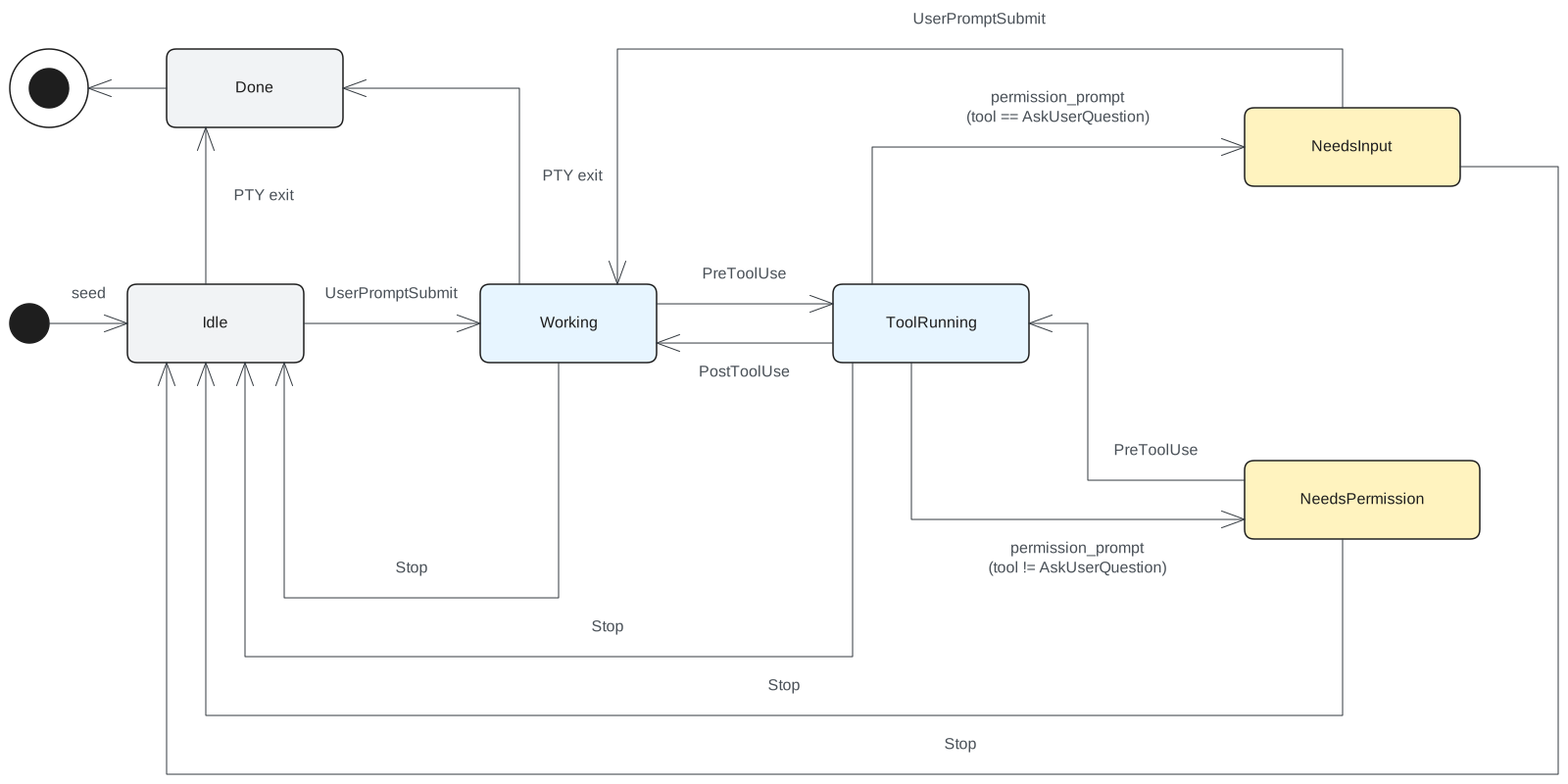
Subagents, teammates, tasks, workflows, and scheduled runs stay out of the diagram, mostly to keep it simple, and to keep the status light confined to the state of the main thread and nothing else. To give insight into that background work, a row of small icons runs along the bottom of each session, one per type, enough to signal that something else is going on. A separate listener infers each icon’s state off the same hook stream. Hovering an icon opens a card with a bit more detail if you want to look.
The architecture
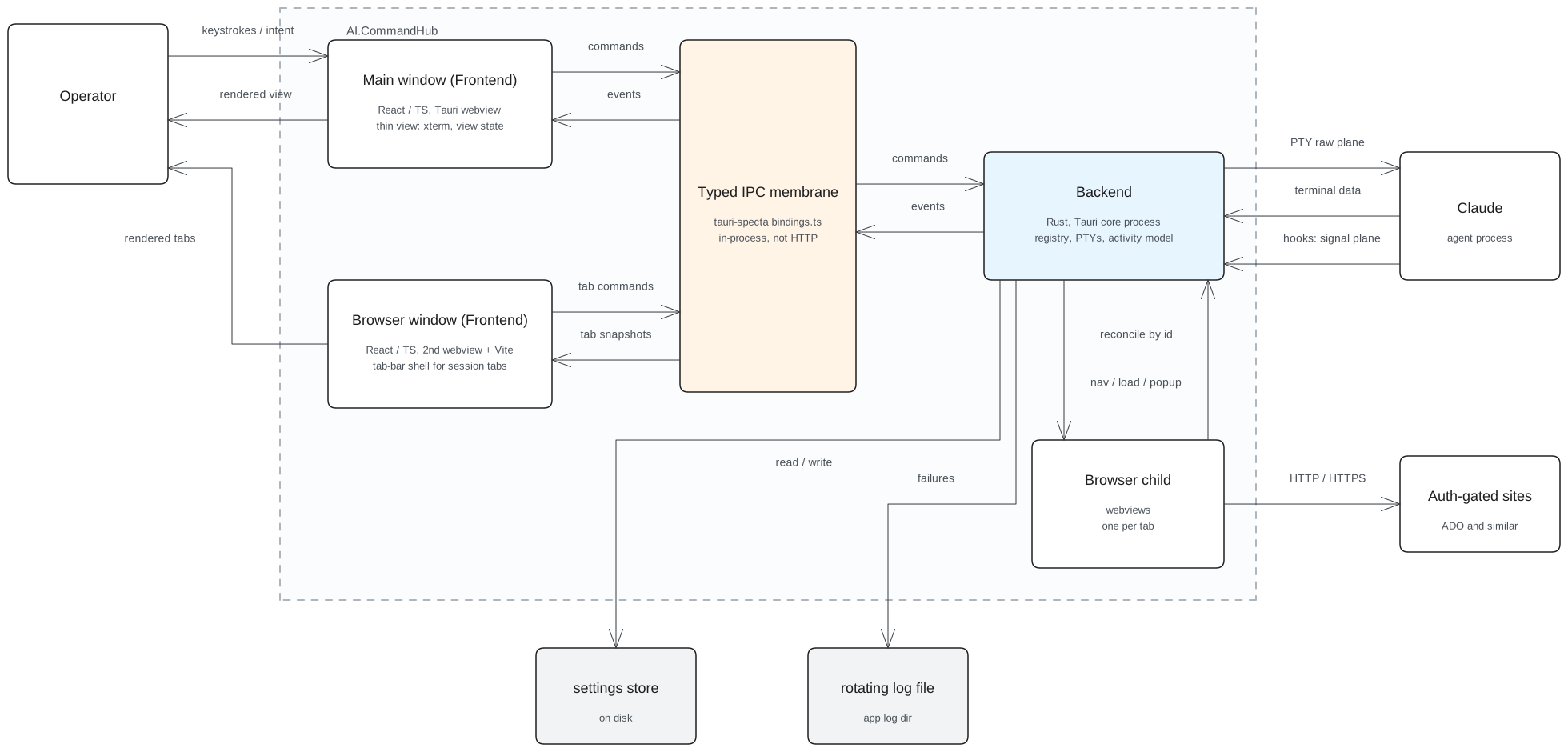
CommandHub launches a Claude process in the background for each session and renders its output through xterm.js. The front end carries presentation and the backend owns the domain, including a PTY per session and the hook server driving the state machine. They meet at a single typed membrane, Tauri’s own local message passing, with commands going one way and events coming back. tauri-specta generates the TypeScript bindings from the Rust types, so the two sides cannot drift out of agreement.
Key decisions
Many projects start out on assumptions about how some piece of the implementation is going to get done or about which features are the ones you actually want. You get your hands on the thing, use it for a while, and a feature you thought you wanted isn’t what you actually wanted after all. This project was no different. It produced a few of those on the way from an idea to version 1.0.
Inferring state was harder than it looked
I wanted to look at the sidebar and know what every session was doing without opening any of them. Everything a session does passes through the terminal’s own byte stream, so the first version worked the status out from it directly, and screen repaints and writes drove what the sidebar showed.
The byte stream can be read for state, and doing it well is far more complicated than it looks from the outside. A screen repaint is indistinguishable from a session producing real output, so a program redrawing itself registered as a program working. Clicking into a terminal makes it send a focus-report byte back, and selecting a session re-fitted its terminal, which repainted the program and counted as activity, so opening a session made it look busy. Deciding a session had gone quiet meant timing the silence, so a session sitting and thinking read as finished.
The live tail ran into similar problems. I run a status line in Claude Code, and the status line is the last thing emitted to the terminal, so what came off the byte stream was the status line and Claude’s actual last message never reached the tail. That pushed me into a proper look at the hooks, and it became clear they were the right source, giving me almost all of what I was after without the additional complexity.
Browsers are more complicated than they seem
I wanted a pull request to belong to the session that produced it. I was opening them in my default browser, and with all of the tabs sitting right there in front of me I still could not tell which session any of them had come from.
The first idea was a split screen, a browser built into the app with Claude on one half and the page on the other. I built it and used it, and half a screen is far too narrow to read a pull request comfortably, so the browser moved out into a window of its own.
What I had at that point was a rendered web page and nothing else. There was no address bar, so I could not tell what I was looking at, and no reload, so I could not pull in a change I had just made. The second open pull request is what brought in a tab bar, and behind the tab bar came reordering them, closing one, closing some of them, and closing all of them.
Every one of those is a quality-of-life thing a browser hands you that I had taken for granted and never thought about. I was building my own custom browser and I did not want to go down that path, so I worked out which features actually matter for the way I work and built those.
Rehydrating multiple sessions is painful
Say five sessions are running and an update comes through. Applying it closes the app down, installs, and relaunches the new version, and every session goes down with it. I bring each one back by hand, working out which was which, typing the resume command, and hunting for the right session in the list. It is tedious and it is easy to get wrong.
Once the auto-update was in, the app had to keep track of the sessions. The first idea was to keep the processes alive across the restart and reattach them. Claude is a process running on the machine, so if it survives the app going away it keeps working and everything is where I left it.
That wasn’t going to work. I had put a container around the whole process tree, so when a session closes the whole tree goes down with it, and that was there because I was getting orphaned processes, so it needed to stay. Next I thought about a permanent host process that owned the Claude processes and never exited, with the front end as a client connecting to it. That suffered from the same problem, because if that host ever needed an update I was right back in the same boat.
A bit more investigation turned up that Claude has a resume parameter, and it takes a session id at process launch. That seemed like the most elegant answer. The one downside is that any subagents that were running do not come back on a resume, and I felt that was an acceptable trade-off. So the app keeps the active session ids in a file, reads that file on startup, and uses it to respawn and resume the sessions that were active.
Where it stands now
It is the first thing I open, and every Claude session I have runs through it, every day. It started as a few-minute prototype and it is my go-to interface for running Claude. I do not mix them up anymore, and I have far better visibility across all of them. A session no longer sits waiting on me without my knowing, and I get more done in a day because of it. I can juggle more sessions at once now than I could before.